How to get a refund for an App Store purchase
Last updated: 15 October 2026
Refunds are handled by Apple
Coin packs bought in the SMS Code app are App Store purchases. Apple bills them and Apple holds the payment, so only Apple can refund one. This is how every app on the App Store works: developers have no way to issue a refund for an Apple-billed purchase.
Apple reviews each request and decides whether to approve it. It usually takes a couple of minutes to submit, and you don't need to contact us first.
Request a refund in 6 steps
- Go to reportaproblem.apple.com.
- Sign in with the Apple Account you used for the purchase.
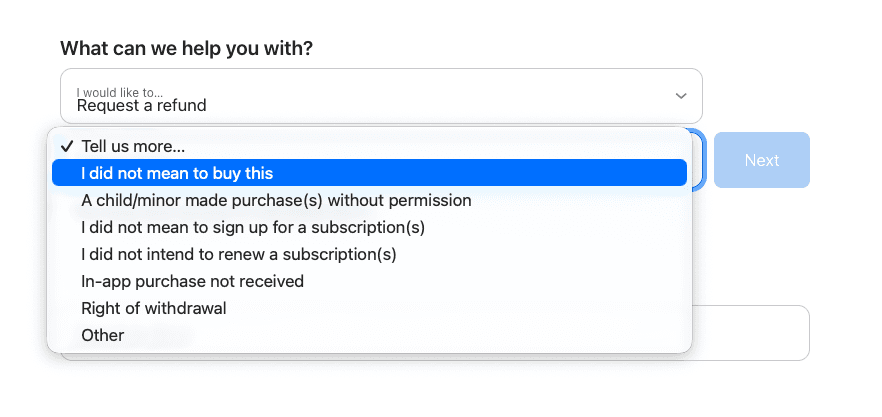
- Under I would like to…, choose Request a refund.
- Choose the reason that fits, for example I did not mean to buy this or In-app purchase not received.
- Select the SMS Code coin purchase (for example 20 Coins) and click Next.
- Submit the request. Apple usually replies within 24–48 hours.
After you submit
You can check the status of the request on the same site. Once Apple approves it, store credit usually returns within 48 hours, cards and most other payment methods within 30 days, and mobile billing within 60 days. We can't speed up Apple or your bank.
If Apple approves a refund, the coins from that purchase are removed from your SMS Code balance. Don't spend coins from a purchase you are asking to refund.
When to write to us instead
Write to us if an activation failed and the coins did not return to your balance, if you paid but the coins never appeared (missing coins), or if Apple asked you to contact the developer. We can review the activation and send you purchase records. Your consumer rights are not affected.
Official Apple guidance
Guidance checked against Apple's official support materials on 30 September 2026. Refund eligibility depends on your region and applicable law.
Still need help?
If this page didn't solve it, send us a request. It reaches a person, and the details above help us answer faster.
Submit a request anyway